Design.
Review.
Approve.
Running.

For you. For your team. Shared context, defined workflows.

Connect your systems, bring your knowledge together, and set up recurring tasks once. Then use the reviewed workflows together – with clear permissions and traceable results.

Open source · MIT · Public beta in preparation – packages will follow once approved

In a nutshell

From AI to workflow. For your everyday work.

You create your workflow in conversation with the AI assistant. Once you have reviewed and approved it, it runs in defined steps – on your own or as a team, with each person's permissions.

Typical tasks

Add customer inquiries to the CRM. Notify the team. Match receipts.

Describe your task – the AI assistant helps you turn it into a reusable workflow.

An example: A new customer pays. Someone notices the payment, copies the customer into the CRM, and lets the team know in chat. Three systems, the same steps, every time.

And when that someone is in a meeting, on vacation, or simply tired, the CRM is out of date and nobody has heard about the sale. Whether you are a solo business, a small team, or a department in a large organization, the knowledge of how to do things properly often lives in one person's head.

What SubKit does

Tell the AI assistant which task you want to automate.

“When a new customer pays in Stripe, create the contact in HubSpot and post it in our sales channel in Slack.”A description you might give SubKit
“Every Tuesday, compare the supplier's price list with the shop, update prices, hide sold-out items, and report discrepancies over 15 percent.”A second example, from retail

The assistant suggests the steps and shows you the draft. You review it. If it is right, you approve it. From then on, it runs – on request, on a schedule, or when another system sends a notification.

Both descriptions are examples of workflows you set up yourselves – not ready-made templates included with the product. The same structure supports supplier reconciliation in your shop, a weekly report from three systems, and a knowledge base that answers questions with sources.

Why this is more than just automation

You decide what your workflow is allowed to do.

You define which systems a workflow may access and what it may do there. SubKit enforces these permissions and logs every run.

Stay in control of your data. Give AI only what it really needs for the task.

You choose which sources and connectors a workflow uses – and with which permissions. If a workflow includes an AI step, its inputs may be sent to the model provider you selected. More on this: Connectors, skills and sources.

EU Data Act · EU AI Act

What you would ask a new colleagueHow SubKit answers
What are they actually allowed to touch?
Approval defines, for each environment, which systems and addresses a workflow can reach and whether it can read or write there. Stored credentials alone do not authorize any changes.
Do they ask someone before doing something consequential?
A workflow can wait for a person's confirmation before sending, paying, or deleting – you define this in the workflow.
What will they cost me?
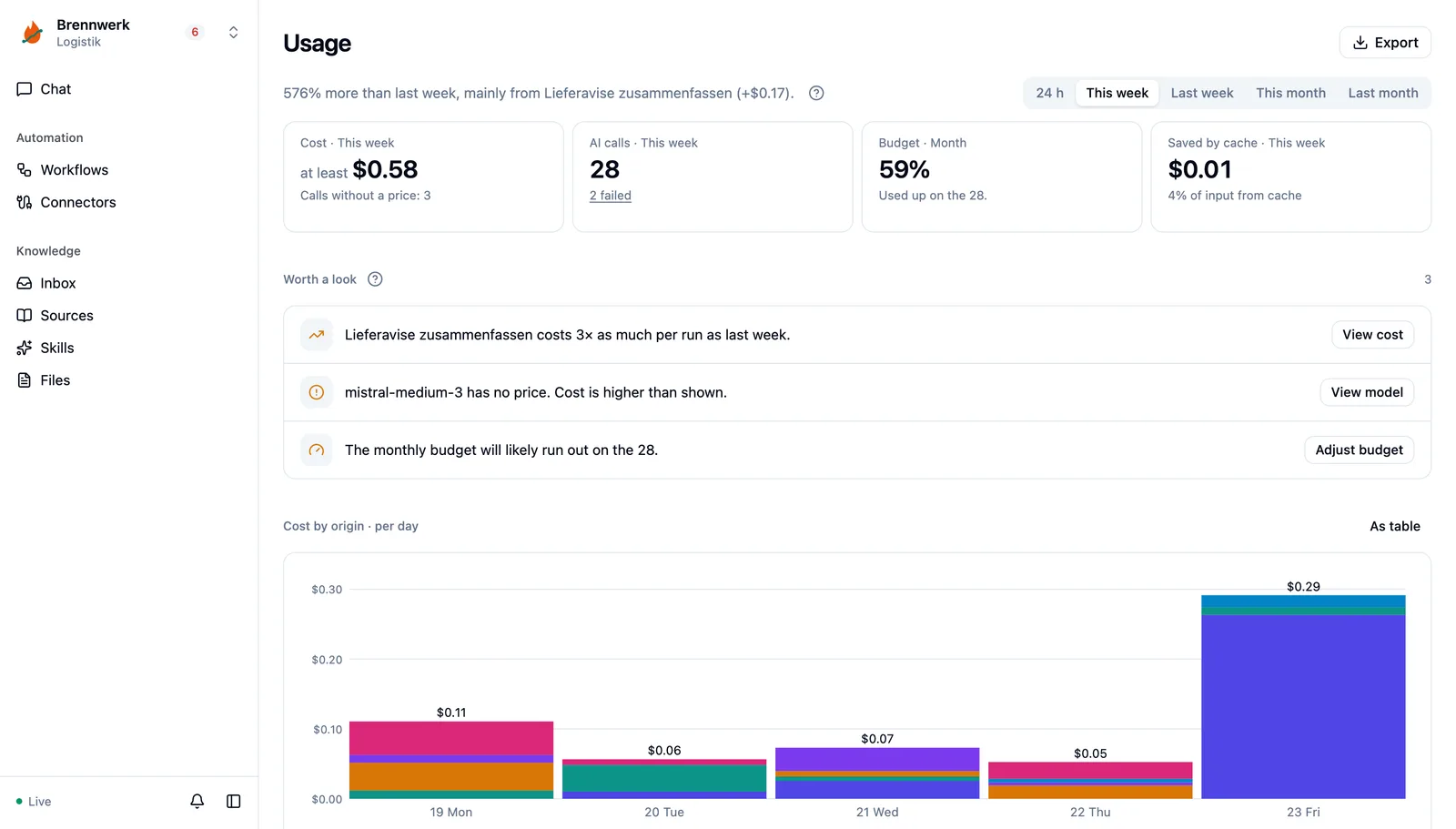
Bring your AI usage together in SubKit: on the Usage page you see, for each period, what AI calls cost and what for – by workflow, person, model and conversation, with notes on anomalies. A monthly budget caps consumption. This covers usage through SubKit; AI services you use separately and your infrastructure have their own costs.
Can I see what they did afterward?
Every run is recorded: when it happened, which version ran, what the result was, and who approved it.

The last point is the crucial one. Many tools can automate something. SubKit sets up workflows so you can trace and explain what happened afterward.

Usage with cost, AI calls, budget and notable changes
The part most people misunderstand

Created in conversation. Executed in defined steps after approval.

Use AI to organize knowledge, condense content and draft connectors or workflows. An authorized person reviews the results. After that, your team can reuse confirmed knowledge and run approved routines without having an AI plan the workflow again every time.

While it is being built

an assistant helps. It understands your sentence, looks at the system you point to and writes down the workflow. It organizes and condenses knowledge as a proposal. Everything stays a draft that a person reads; nothing is adopted automatically.

While it is running

the approved workflow defines which steps happen and what they are allowed to do. Routines without an AI step run without a model call. If an AI step is explicitly configured, the workflow calls a model through a connector – at exactly that point, for exactly that task; this causes usage. Model responses and data from external systems can vary, so fixed steps do not always mean the same result.

That keeps what a run did traceable.

How it works

Your task becomes a repeatable workflow.

Every run follows the defined steps and is logged. Four steps, always in this order. Approval is the point where a draft becomes binding.

  1. 01

    Design

    Describe the task, the tools involved, and the desired result – in the terminal or in chat. SubKit examines the systems involved and writes down the workflow.

    One conversation. With access to the files, sources, and rules you authorize.
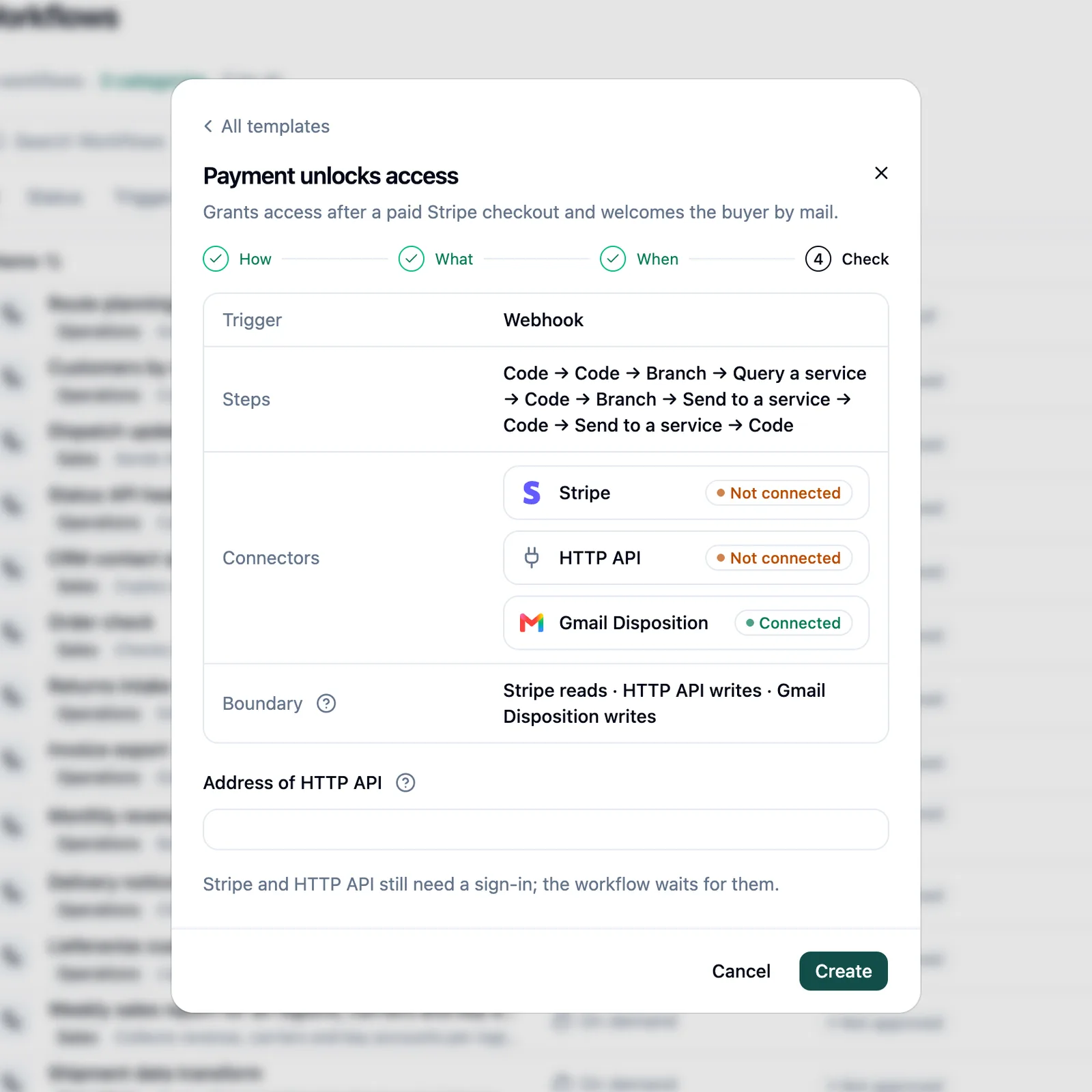
    Workflow wizard at the Check step
  2. 02

    Review

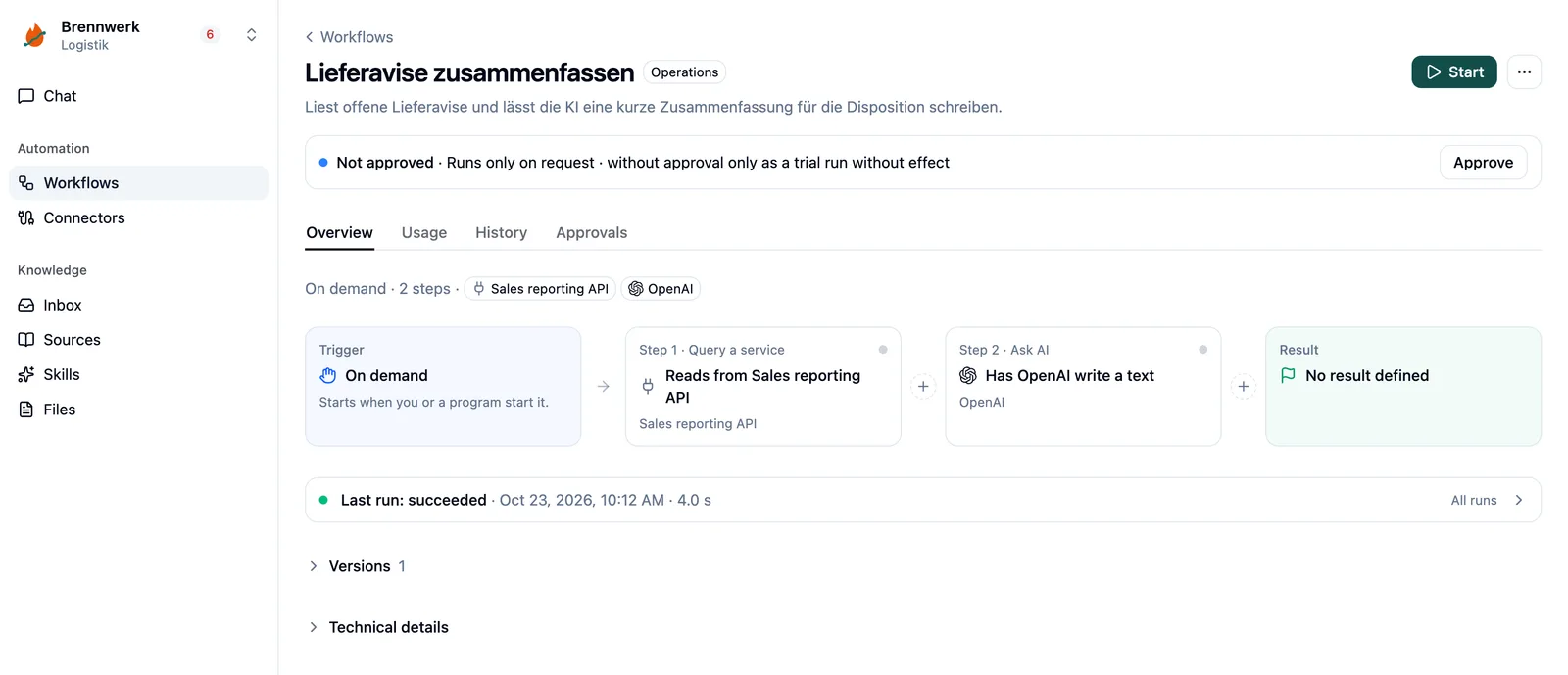
    Review the draft: Are the data, steps, and proposed changes correct? You see every step and which system it addresses. A trial run shows what would be sent – for a reconciliation, for example, a list of prices that would change. Runs against real systems have real effects; use the Test environment for them.

    Version · Steps · “Start trial run”
    Workflow flow with trigger, query a service, ask AI and result
  3. 03

    Approve

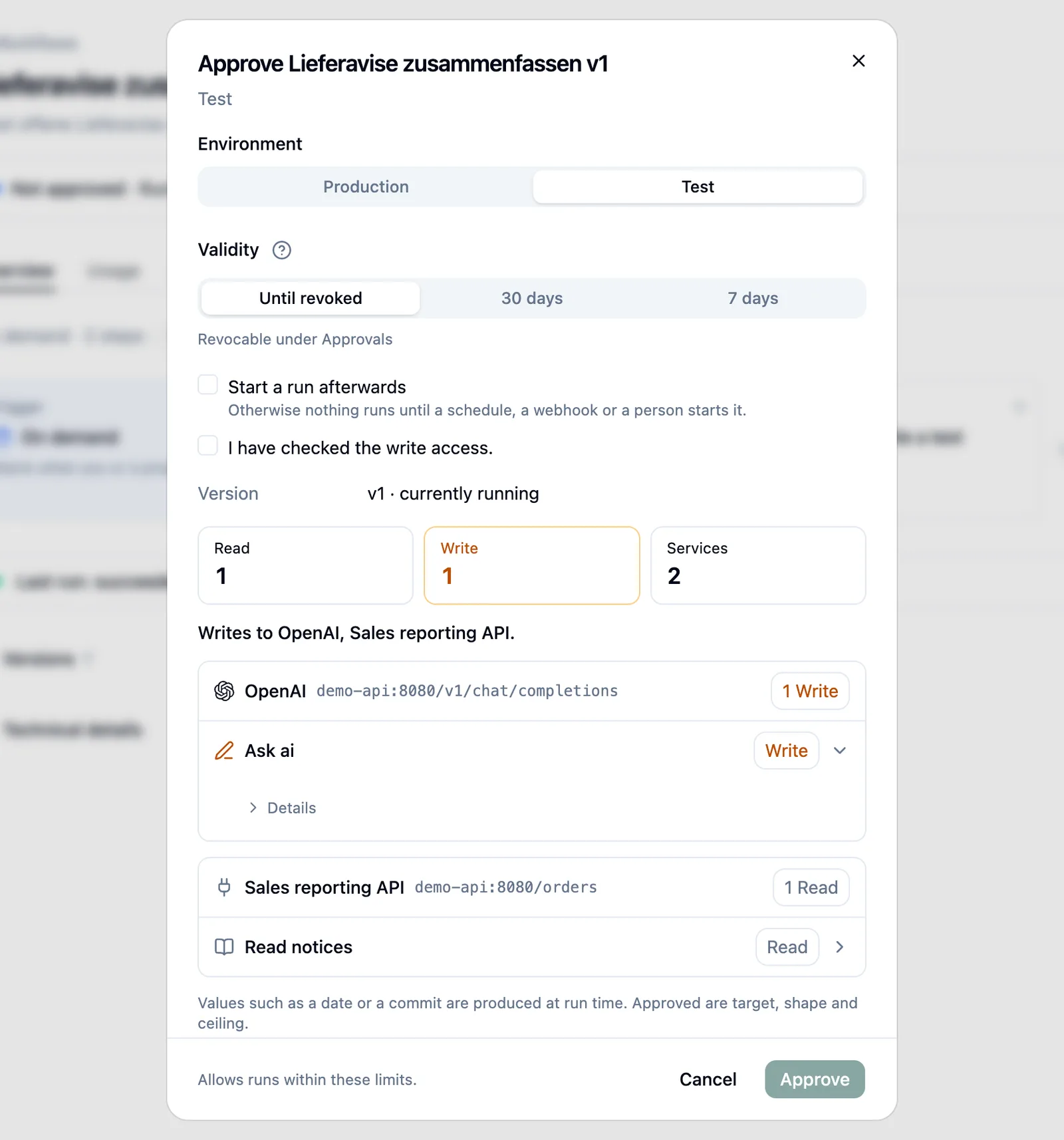
    An authorized person defines which systems the workflow can reach and what it may change: which environment, which systems and addresses, and whether it may read or write. Approval can remain valid until revoked and carries over to each new version that does not expand its scope. If a workflow needs more, it needs new approval.

    Scope · Environment · Until revoked. Revoke at any time.
    Approval dialog with environment, validity and allowed services
  4. 04

    Start

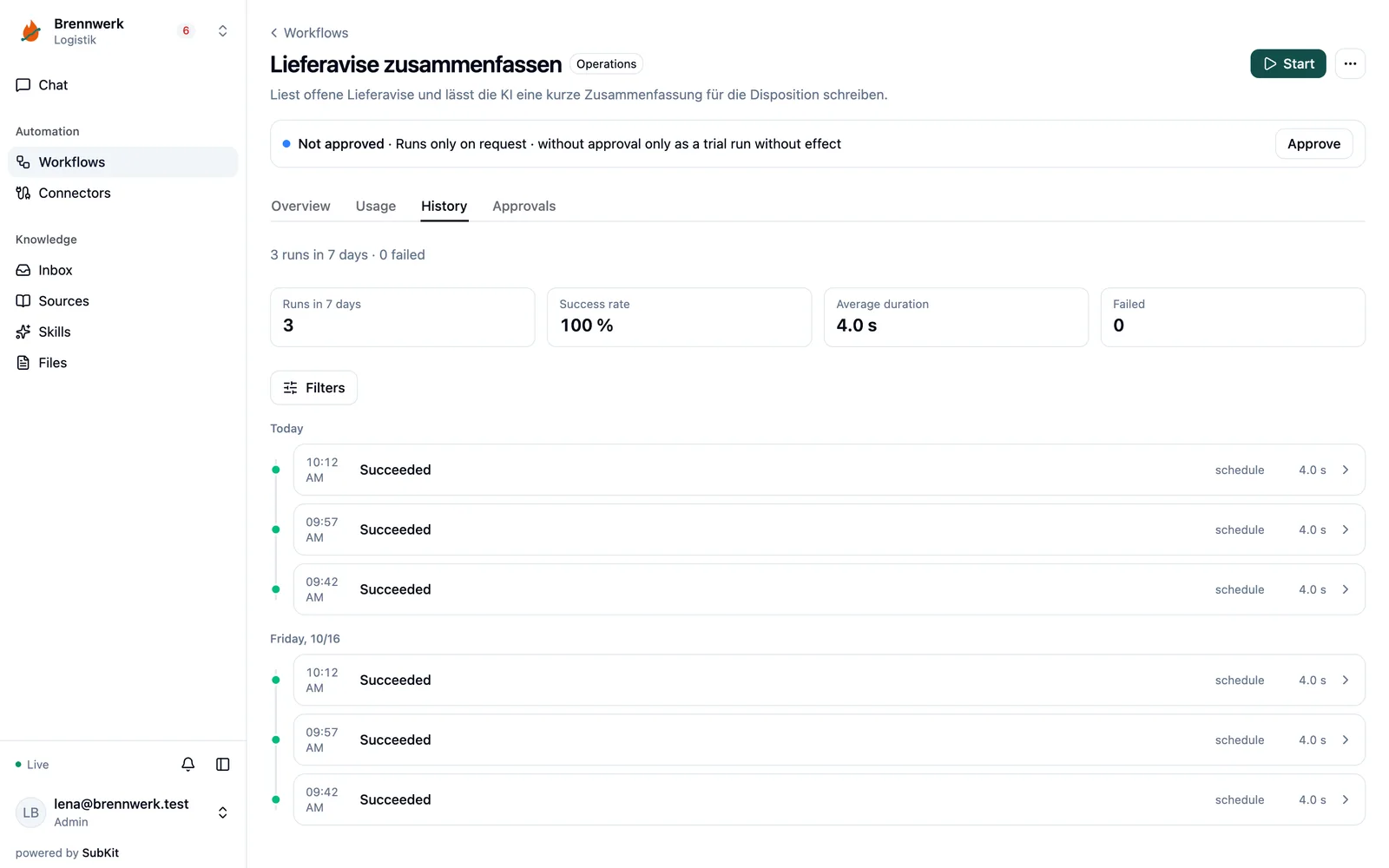
    Start the approved workflow and see in the history which version ran and how it ended. On a schedule, on request, or when another system sends a notification – nobody needs to be present.

    One run, one entry. Still readable months later.
    Workflow history with runs on a timeline

The underlying rule: A reviewed workflow defines the steps and permitted effects. AI can be involved at specific points; model responses and results from external systems may vary. Team chat and an AI agent run workflows; they do not rewrite them. Changes can be made step by step in the cockpit, as a file on the command line, or in the design chat – always as a new version for a person to read.

Your team and its AI agents

SubKit comes to where your team already works.

Nobody needs to learn a new application. SubKit shows up in the tools you already have – and those places are not interchangeable. You choose according to the task.

  • Run something and read the resultIn team chat – Slack, Teams, Google Chat – or in an AI client in the browser
  • Ask how the team usually does somethingIn a coding agent such as Claude Code, Codex, or Cursor – or in the AI client
  • Describe a new workflow for the first timeIn a conversation – in the terminal or in chat
  • Change a step or go back a versionStep by step in the cockpit or as a file on the command line – both create a new version
  • Approve somethingThrough the link you received or on the command line

For an AI agent, every approved workflow is a tool.

SubKit is an MCP server for Claude Code, Codex, Cursor, and other AI clients. Every saved workflow appears there as a callable tool, alongside connectors, knowledge, and skills. The agent can start the workflow, read the result, query connectors, and look up knowledge it is allowed to see.

And the other way around: An MCP server your team already uses becomes a connector in SubKit. The admin decides, tool by tool, which of its tools may run without asking first.

What it cannot do: more than the person using it is allowed to do. Access that permits reading and running does not permit designing. Actions with external effects still require confirmation. And every call appears in the same history as everything else – an agent is not a back door.

That is the real benefit: Your team gives its AI tools access to real data sources and real workflows – with exactly the permissions each person has, and without anyone copying credentials into a prompt.

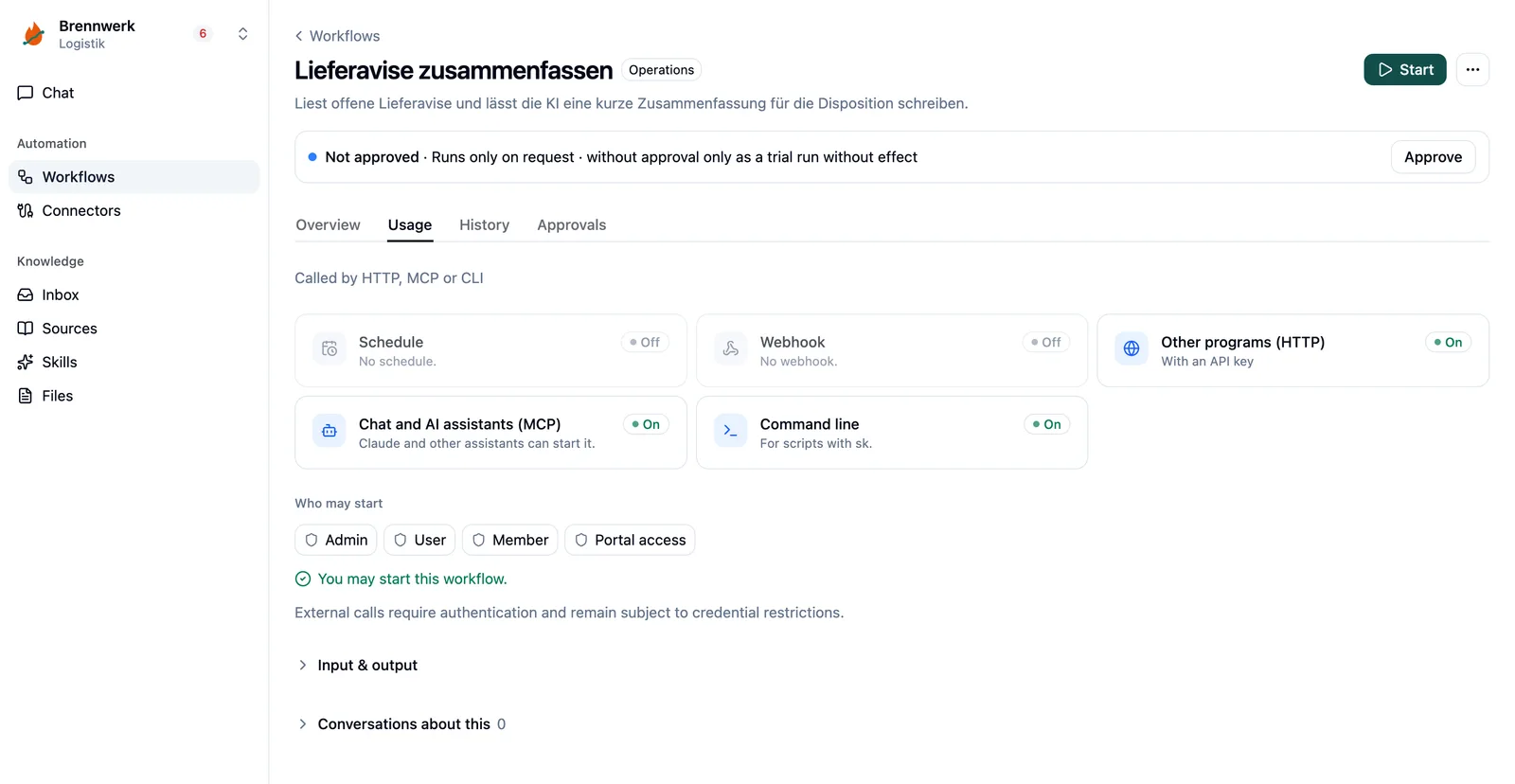
Workflow usage via schedule, webhook, HTTP, MCP and CLI
What makes designing better

An assistant that knows your work, instead of a blank page.

Your domain knowledge, house rules and playbooks are available to the whole team. SubKit connects this context with approved data access and reusable workflows. Everyone sees and uses what they are authorized to.

Connector

The system that holds the source of truth

The connection to one of your team's tools – with its own credentials, kept secure, and an environment: test or production. The assistant also helps you create connectors – without having to work through API documentation. With defined permissions, you can reuse them in other workflows.

Skills

Rules the assistant follows

“Anything over €1,000 needs two approvals.” “This provider reports errors with status 200.” Provider quirks, your house rules and playbooks as shared work instructions. That way the whole team reuses confirmed domain and process knowledge from one place. Skills help with drafting; limits are enforced by technical permissions and approvals.

Sources

Documents it looks things up in

The expense policy as a PDF, the internal API description, a website. Answers state what they read – or say that it isn't there. Sources have versions with an author and a schedule on which SubKit rereads an address. Who sees which knowledge and files follows their permissions.

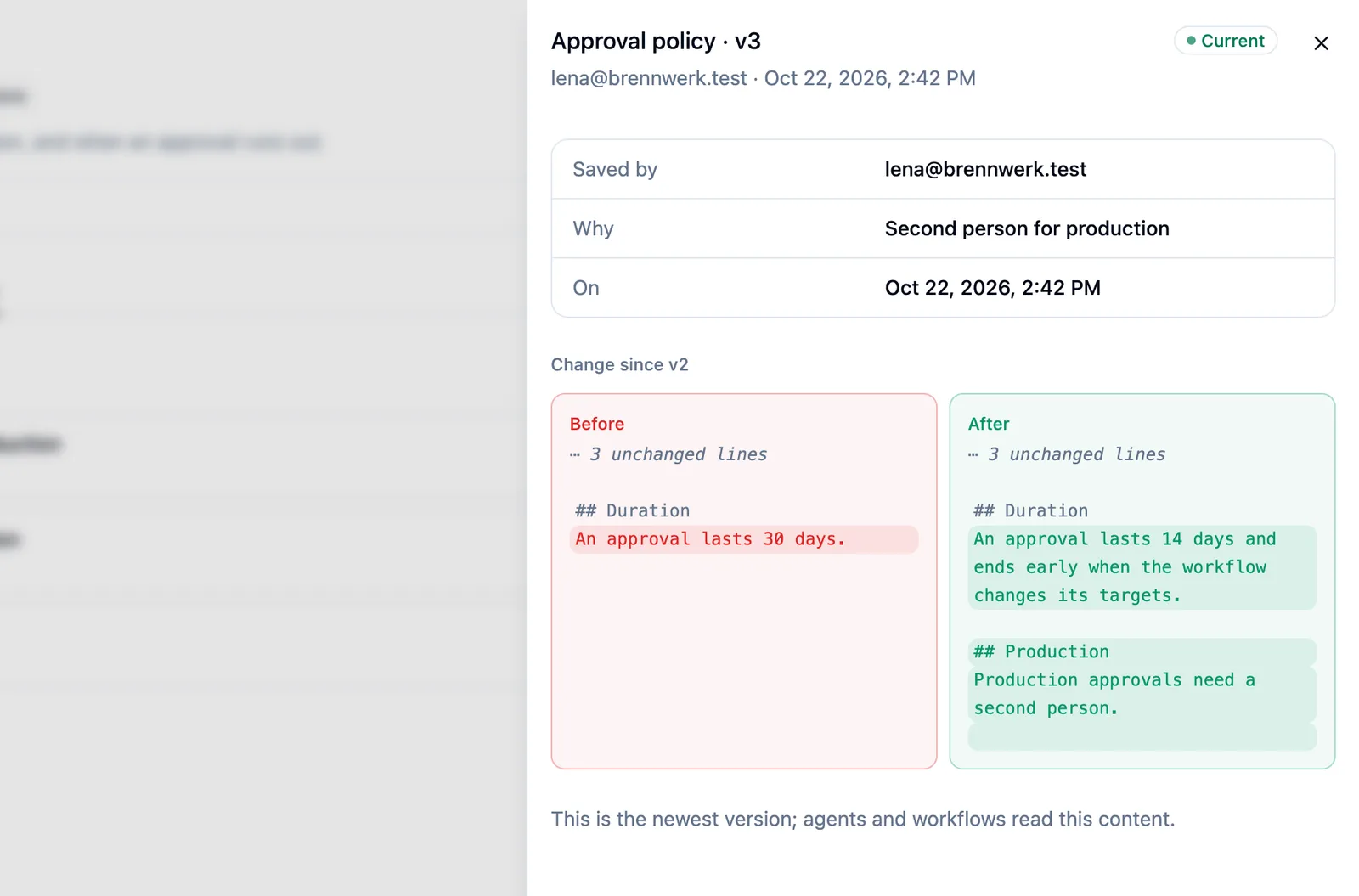
Source version with before and after
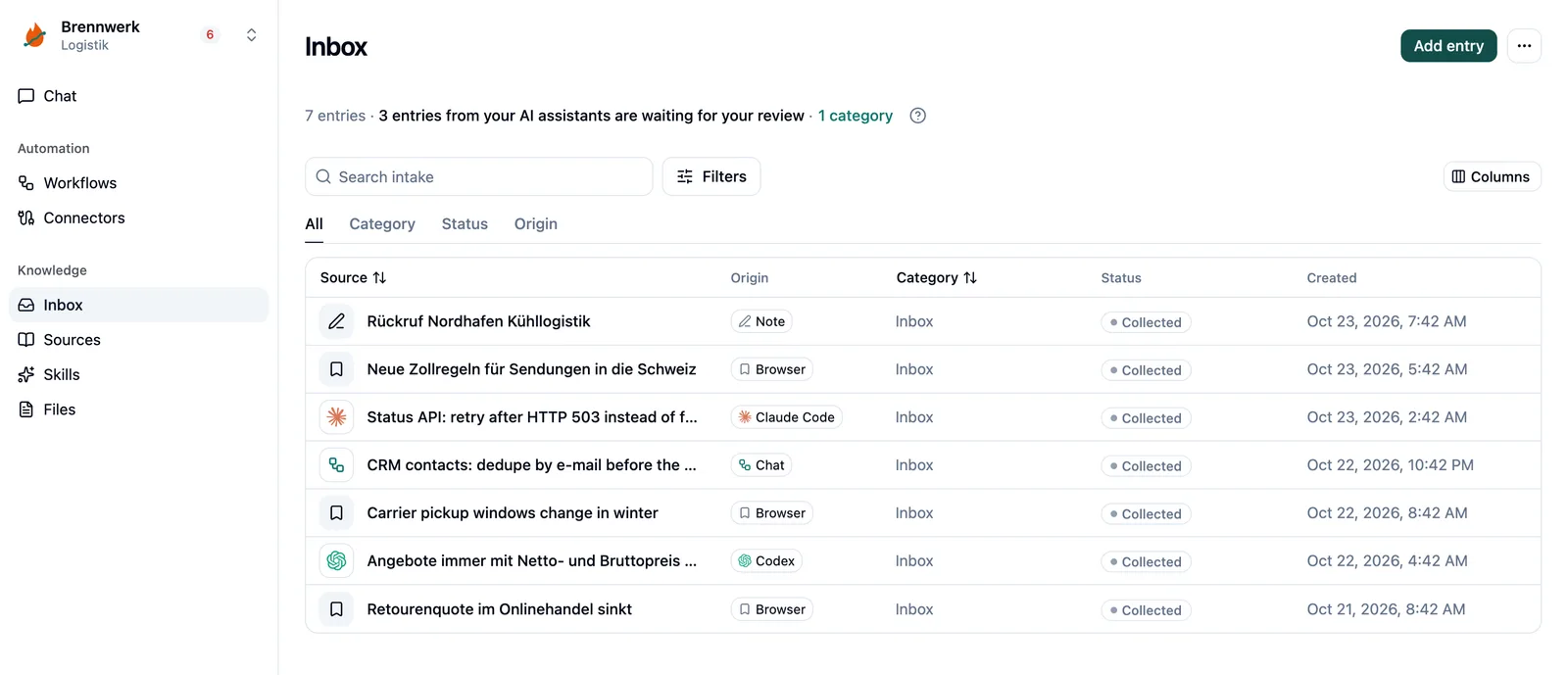
Inbox with items from Claude Code, Codex, Chat, browser and note

Files are part of it.

A workflow can read, pass on, or generate a file you attach in chat – a report, an invoice, an export. It is stored in SubKit, not in a prompt. Permissions determine who can see which knowledge and files.

From collection to knowledge – but only with human confirmation.

The direction: collect material in the inbox, review and prepare it in chat, then explicitly confirm it – only then does it become accepted knowledge or a skill available to the next draft. Raw excerpts are not confirmed knowledge. This complete process has not yet been publicly released. If a provider changes its interface, SubKit suggests a fix – it is applied only after approval.

For IT: what SubKit is technically

An AI agent framework built for business use cases. Not for everything.

SubKit is a framework for AI agents that design and fix workflows – producing a reviewed, versioned workflow artifact, plus the defined runtime for that exact artifact.

General-purpose agent tools such as Claude Code are designed to let a model work freely: with a shell, file system, subagents, and long runs. SubKit deliberately takes the opposite approach. The agent helps during design; during execution, it participates only where the workflow specifies an AI step. Between the two is an artifact that a person can read, review, and approve – and that then follows the same path every time.

That makes SubKit the central place for defined business workflows: one place where AI assistance, permissions, credentials, and history come together, rather than being handled separately in each tool.

Technical details for IT

What you would have to build yourself with a coding agent.

A server, schedules, and updates. Credentials, sign-in flows, token renewal. Retries and error categories. Permissions, approvals, history. An interface and chat for colleagues. Trial runs, versions, test separated from production. And all of it again for the next workflow, because a script in a repository is rarely reusable for the next task.

SubKit includes all of that.

Every workflow, connector, and skill can be reused for the next one, with a description and category your agent can read too. Your coding agent remains your tool for software. For your company's routine work, it designs workflows in SubKit and starts them there. See the comparison →

What that means in practice

  • Tenants are isolatedEvery stored row belongs to a tenant. There is no cross-tenant read access without explicit permission and a history entry.
  • Test and production per connectorEvery system connection has an environment. A workflow running in test cannot access production data – and an approval applies to one environment.
  • AI settings per tenantProvider, model, and budget are defined per tenant. What a team designs runs with that team's settings, not global ones.
  • A permission check at every entry pointChat, command line, API, AI agent, schedule, incoming notification: the same checkpoint, the same record.
  • Encrypted credentialsThey are stored encrypted and redacted in logs. They appear neither in the workflow nor in a message to the AI.
  • External code only in a cageSmall transformations and fixes run in an isolated sandbox with a fixed compute budget – never directly on the server.
  • Append-only historyEvery approval, every credential change, every fix, and every run is appended, not overwritten.
  • Scope approvalApproval binds the environment and scope: systems, addresses, read or write. It can remain valid until revoked and carries over to every version that does not expand its scope; a wider scope requires new approval.
  • Signed inputsIncoming notifications are verified using the sender's scheme: Stripe, GitHub, Standard Webhooks, or HMAC. Nothing starts without verification.
  • Usage per run, budget per tenantA price list converts tokens into monetary amounts; custom prices override it. When the monthly budget is used up, chat, design and fixes pause until the first of the month.
  • A complete stackThe engine, cockpit, and command line run with the required services as a release Compose deployment. Setup, updates, and backups are part of operations.

What SubKit deliberately is not

  • Not a general-purpose agent.No shell access, no file system workspace, no subagents, no unrestricted long-running execution. If you need that, use a developer tool – and connect SubKit to it.
  • Not a chat product.Chat is an entry point for running and designing workflows. It is not the product.
  • Not an AI provider.SubKit does not come with its own model. You choose the provider per tenant; during execution, it is called only in steps the workflow specifies for that purpose.
  • Not a data migration tool.Moving large numbers of records and reconciling them field by field is a different task.

A business domain is a trio.

Connector (the system that holds the source of truth), skill (the rules the agent follows), and source (the documents it looks things up in) – linked by a shared category.

One vocabulary across everything.

Workflows, connectors, sources, skills, and files share the same category, such as “Sales” or “Accounting.” Anyone opening a category sees everything belonging to that area of work that they are allowed to see – and whether it was created by a person or by AI.
What you have at the end

Three outcomes, not a toolbox.

01

Your recurring routines run as defined workflows.

Acceptance: You inspect a real run and check the result. Start with a task whose outcome you can judge confidently.

02

Your AI experiments become reviewable.

What three people wired together manually becomes a traceable operation. Who may do what, what needs approval, what happened when, what resources it used – all in one place.

03

Your connections stay in view.

If a provider changes its interface, SubKit detects it and suggests a fix instead of silently breaking. The fix is applied only after approval.

What SubKit does not do: migrate old data.

Transferring large numbers of records from one system to another and reconciling them field by field is a different task that needs different tools.

And it does not invent work.

If nobody has described it and nobody has approved it, nothing runs.

Examples

Start with a specific task.

  1. 01

    Personal assistant

    One person, their own tools. A pricing page without an export: SubKit reads it daily and emails you when the price changes.

  2. 02

    The company that answers questions

    “How do we usually do this here?” – answered from your own documents, with a source citation. Or, honestly: “That is not documented anywhere.”

  3. 03

    Work across multiple systems

    Forward contact requests to the team inbox according to fixed rules. Compile and send a report from five systems every morning. Maintain a product catalog according to defined rules.

  4. 04

    Work that waits for a person

    Detect duplicate and outdated contacts and clean them up after review. Something needs a yes before it goes out – SubKit waits for a defined period, then proceeds or leaves it alone.

  5. 05

    A memory for your AI tools

    Your team's confirmed knowledge becomes something AI assistants can look up according to their permissions – instead of guessing.

These examples are possible workflows to set up, not ready-made templates included with the product or customer reports. Available connections depend on documented interfaces, configured access, and permissions. All use cases

For teams that run it themselves

Run it yourself. Connect deliberately.

SubKit is open source under the MIT license and can be self-hosted – if you like, reachable only within your company network or through your company VPN. You decide which services and model providers you connect. Calls to them can send data to these providers. Setup, updates and backups are part of running it.

The self-hosting offering is free. Infrastructure and external providers may incur costs. Multiple teams remain cleanly isolated as tenants.

Start self-hosting → View source code Read the changes
Where to go next

Start with a task whose outcome you can judge confidently.

Request a beta invitation →

Or start self-hosting → · Talk about your workflow

The public beta is being prepared. The reviewed installation guide and approved packages will follow.

Privacy settings

Necessary preferences

Your privacy choice is stored on your device. Forms also keep a request ID and timestamp for the session, without form contents. Language and appearance follow your browser and system, without saved preferences.

Analytics

Analytics is not available on this website at present. No Google Analytics script is loaded and no measurement is sent.

Privacy notice